Full Code is here as a placeholder - this page in need of update
This post contains code showcasing a use of the Java coding language for a project for which myself and a partner created a user interface through Vaadin allowing the user to input information in the user interface. The program takes this information and implements it into an optimization model using an algorithm written by the authors.
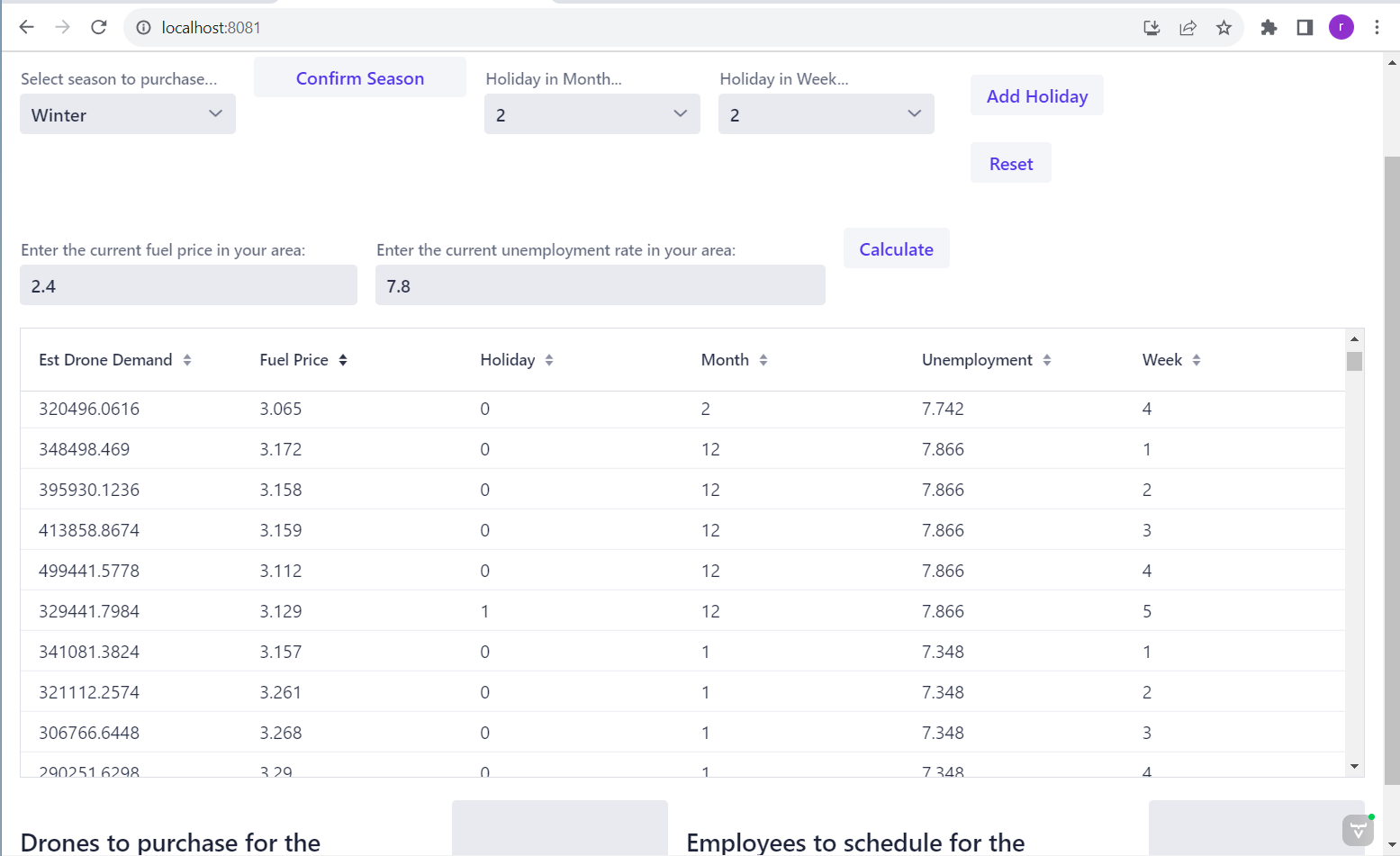
```{java}
package com.example.demo;
import com.vaadin.flow.component.button.Button;
import com.vaadin.flow.component.combobox.ComboBox;
import com.vaadin.flow.component.dependency.CssImport;
import com.vaadin.flow.component.grid.Grid;
import com.vaadin.flow.component.html.*;
import com.vaadin.flow.component.orderedlayout.HorizontalLayout;
import com.vaadin.flow.component.orderedlayout.VerticalLayout;
import com.vaadin.flow.component.textfield.IntegerField;
import com.vaadin.flow.component.textfield.NumberField;
import com.vaadin.flow.component.textfield.TextField;
import com.vaadin.flow.router.Route;
import tech.tablesaw.api.Row;
import tech.tablesaw.api.Table;
import java.io.FileNotFoundException;
import java.util.*;
@Route("")
@CssImport("./styles/shared-styles.css")
@CssImport(value = "./styles/vaadin-text-field-styles.css", themeFor = "vaadin-text-field")
public class MainView extends VerticalLayout {
/**
* Represents the data related to each column in the Excel file.
*/
private TextField month = new TextField("Month");
private TextField week = new TextField("Week");
private TextField fuelPrice = new TextField("FuelPrice");
private TextField unemployment = new TextField("Unemployment");
private TextField estDroneDemand = new TextField("EstDroneDemand");
/**
* Initiates each list needed.
*/
private static List<Demand> demandList = new ArrayList<>();
private static List<Drones> droneList = new ArrayList<>();
private static List<Employees> employeeList = new ArrayList<>();
private static List<Double> demands = new ArrayList<>();
private static List<Integer> weeks = new ArrayList<>();
/**
* Initiates the grid from the demand class.
*/
private Grid<Demand> grid = new Grid<>(Demand.class);
public MainView() throws FileNotFoundException {
/**
* Using Vaadin, create a new layout to arrange components one after another horizontally so that
* they all share the same row.
*/
HorizontalLayout horizontalLayout = new HorizontalLayout();
/**
* Create a header to title the GUI.
*/
H3 header = new H3("Purchasing and Scheduling Drones");
/**
* Read in the data from the csv file using Tablesaw.
*/
Table allData = Table.read().csv("data/GeneralData.csv");
/**
* Filter the data so that any rows with missing data in any of the columns is removed.
*/
Table finalData = allData.dropRowsWithMissingValues();
/**
* Call the loadDemand method (in the MainView class but not in the MainView method) to load
* the data from the csv file stored in the finalData table into the demandList array list so
* that you can use this list to set the content for the grid. Pass the method the finalData table.
*/
loadDemand(finalData);
/**
* Use the demandList created by the loadDemand method to set the items in the grid.
*/
grid.setItems(demandList);
/**
* Create a ComboBox prompting the GUI user to select a season.
*/
ComboBox seasonComboBox = new ComboBox("Select season to purchase/schedule for:");
/**
* Set the items in the ComboBox to the four seasons.
*/
seasonComboBox.setItems("Winter", "Spring", "Summer", "Fall");
/**
* Create a button so that we can take the input from the ComboBox and use it to filter the table.
*/
Button showDataButton = new Button("Update");
/**
* Adjust the orientation of the button.
*/
showDataButton.setWidth("150px");
/**
* Create a box prompting the user to input a double value for the current fuel price
* in their area.
*/
NumberField fuelPrice = new NumberField("Enter the current fuel price in your area:");
/**
* Adjust the orientation of the fuelPrice NumberField.
*/
fuelPrice.setWidth("300px");
/**
* Create a box prompting the user to input a double value for the current unemployment rate
* in their area.
*/
NumberField unemployment = new NumberField("Enter the current unemployment rate in your area:");
/**
* Adjust the orientation of the unemployment NumberField.
*/
unemployment.setWidth("400px");
/**
* Create a label to let the user know that the data already considers major holidays,
* so that they do not notify the GUI of those holidays when prompted.
*/
H1 holidayHeader = new H1("Not Including Major Holidays");
/**
* Create a box prompting the user to enter an integer value for the number of additional holidays,
* local events, store-wide sales events, etc. in the season.
*/
IntegerField holidayIntegerField = new IntegerField("How many extra holiday/events in the season: ");
/**
* Adjust the orientation of the holiday selection IntegerField.
*/
holidayIntegerField.setWidth("350px");
/**
* Adjust the orientation of the label that lets the user know not to include major holidays in
* the box where they enter the information regarding occasions and events. Make it a small label
* so that it looks like a message rather than a prompt for a new field.
*/
holidayHeader.getStyle().set("font-size", "10px");
/**
* Create a box for the value of the average weekly demand to go.
*/
TextField meanTextField = new TextField("Average Demand:");
/**
* Create a box for the value of the minimum weekly demand to go.
*/
TextField maxTextField = new TextField("Max Demand:");
/**
* Create a box for the value of the maximum weekly demand to go.
*/
TextField minTextField = new TextField("Min Demand:");
/**
* Read in the data from the DroneData csv using Tablesaw and store it in a table called tempDrones.
*/
Table tempDrones = Table.read().csv("data/DroneData.csv");
/**
* Use the loadDrones method to load the table of drone data into an array list called droneList.
* This is a list of Drone objects, so it stores all variables of the individual Drone objects.
*/
loadDrones(tempDrones);
/**
* Create an array to parse through single columns of information in the droneList array list.
* Label this array "costs" and use it to parse through the costs column of the drone data.
* Set the size of this array to be the same size as droneList.
*/
double[] costs = new double[droneList.size()];
/**
* Create an array to parse through single columns of information in the droneList array list.
* Label this array "capacities" and use it to parse through the capacities column of the drone data.
* Set the size of this array to be the same size as droneList.
*/
double[] capacities = new double[droneList.size()];
/**
* Iterate through droneList and store each drone's cost and capacity in its respective array.
*/
for (int i = 0; i < droneList.size(); i++) {
costs[i] = droneList.get(i).getCost();
capacities[i] = droneList.get(i).getCapacity();
}
/**
* Create an area for the value of the total cost for the season to go once calculated.
*/
NumberField totalCostField = new NumberField("Total Cost this Season:");
/**
* Adjust the orientation of the total cost field.
*/
totalCostField.setWidth("250px");
/**
* Create a series of text boxes for the resulting quantities of each type of drone that
* our program recommends for the user of the GUI to purchase.
*/
TextField[] quantityFields = new TextField[costs.length];
/**
* Create a new layout for components to be added one below another, in a top-down order.
*/
VerticalLayout layout1 = new VerticalLayout();
/**
* Create a header for the vertical layout where you inform the user which drones to purchase
* for the upcoming season.
*/
H1 header1 = new H1("Recommended Purchases: ");
/**
* Adjust the orientation of the header.
*/
header1.getStyle().set("font-size", "14px");
/**
* Add the header to the vertical layout.
*/
layout1.add(header1);
/**
* Create a new layout for components to be added one below another, in a top-down order.
*/
VerticalLayout layout2 = new VerticalLayout();
/**
* Create a header for the vertical layout where you inform the user which employees to hire
* for the upcoming season.
*/
H1 header2 = new H1("Recommended Employees: ");
/**
* Adjust the orientation of the header.
*/
header2.getStyle().set("font-size", "14px");
/**
* Add the header to the second vertical layout.
*/
layout2.add(header2);
/**
* Create a new layout to add components one above the other in a top-down order.
*/
VerticalLayout layout3 = new VerticalLayout();
/**
* Add the total cost field to its own respective layout.
*/
layout3.add(totalCostField);
/**
* On the showDataButton button, add a click listener and use the event for the click listener
* to do background calculations and write algorithms to make decisions based off of the input
* from the GUI user.
*/
showDataButton.addClickListener(e -> {
/**
* Collect the fuel price from the user input.
*/
Double fuelPriceValue = fuelPrice.getValue();
/**
* Collect the unemployment rate from the user input.
*/
Double unemploymentValue = unemployment.getValue();
/**
* Check that the values input for fuel price and unemployment rate are valid (that they
* are not null/missing).
* Using the standard deviation from the data for the fuel price and unemployment rate, use
* this all-encompassing if statement to perform sub-if statements to filter the data to
* more accurately reflect the fuel price and unemployment rate input by the user rather than
* accounting for and making calculations/decisions based off all fuel prices and unemployment
* rates in the data.
*/
if (fuelPriceValue != null && unemploymentValue != null) {
/**
* Set the minimum allowed fuel price and maximum allowed fuel price accordingly based
* off the standard deviation. Repeat for unemployment rate.
*/
double minFuelPrice = fuelPriceValue - 0.5;
double maxFuelPrice = fuelPriceValue + 0.5;
double minUnemployment = unemploymentValue - 2;
double maxUnemployment = unemploymentValue + 2;
/**
* Use a series of if and else-if statements to iterate through all possible selections for season
* and filter the data based on the months in that season, and then filter the data further to only
* capture rows of data within the acceptable range of fuel price and unemployment rate.
* Use the loadDemand method again to load the newly filtered data into the demandList array list
* and then use the newly filtered list of data to update the contents of the grid.
* If there is not a season selected, the grid should remain set to the original data.
*/
if (seasonComboBox.getValue().equals("Winter")) {
int[] winterMonths = {12, 1, 2};
Table season = finalData.where(finalData.intColumn("Month").isIn(winterMonths)
.and(finalData.doubleColumn("FuelPrice").isGreaterThanOrEqualTo(minFuelPrice))
.and(finalData.doubleColumn("FuelPrice").isLessThanOrEqualTo(maxFuelPrice))
.and(finalData.doubleColumn("Unemployment").isGreaterThanOrEqualTo(minUnemployment))
.and(finalData.doubleColumn("Unemployment").isLessThanOrEqualTo(maxUnemployment)));
loadDemand(season);
grid.setItems(demandList);
} else if (seasonComboBox.getValue().equals("Spring")) {
int[] springMonths = {3, 4, 5};
Table season = finalData.where(finalData.intColumn("Month").isIn(springMonths)
.and(finalData.doubleColumn("FuelPrice").isGreaterThanOrEqualTo(minFuelPrice))
.and(finalData.doubleColumn("FuelPrice").isLessThanOrEqualTo(maxFuelPrice))
.and(finalData.doubleColumn("Unemployment").isGreaterThanOrEqualTo(minUnemployment))
.and(finalData.doubleColumn("Unemployment").isLessThanOrEqualTo(maxUnemployment)));
loadDemand(season);
grid.setItems(demandList);
} else if (seasonComboBox.getValue().equals("Summer")) {
int[] summerMonths = {6, 7, 8};
Table season = finalData.where(finalData.intColumn("Month").isIn(summerMonths)
.and(finalData.doubleColumn("FuelPrice").isGreaterThanOrEqualTo(minFuelPrice))
.and(finalData.doubleColumn("FuelPrice").isLessThanOrEqualTo(maxFuelPrice))
.and(finalData.doubleColumn("Unemployment").isGreaterThanOrEqualTo(minUnemployment))
.and(finalData.doubleColumn("Unemployment").isLessThanOrEqualTo(maxUnemployment)));
loadDemand(season);
grid.setItems(demandList);
} else if (seasonComboBox.getValue().equals("Fall")) {
int[] fallMonths = {9, 10, 11};
Table season = finalData.where(finalData.intColumn("Month").isIn(fallMonths)
.and(finalData.doubleColumn("FuelPrice").isGreaterThanOrEqualTo(minFuelPrice))
.and(finalData.doubleColumn("FuelPrice").isLessThanOrEqualTo(maxFuelPrice))
.and(finalData.doubleColumn("Unemployment").isGreaterThanOrEqualTo(minUnemployment))
.and(finalData.doubleColumn("Unemployment").isLessThanOrEqualTo(maxUnemployment)));
loadDemand(season);
grid.setItems(demandList);
} else {
loadDemand(finalData);
grid.setItems(demandList);
}
/**
* Convert the contents of the demandList to a stream so that you can perform functions on its
* individual elements.
* Map each of the elements in the stream to a double using the getEstDroneDemand method of the
* Demand objects.
* Calculate the average of all the values in the stream.
* If the stream is empty, set the averageDemand variable equal to zero.
*/
double averageDemand = demandList.stream()
.mapToDouble(row -> row.getEstDroneDemand())
.average()
.orElse(0.0);
/**
* Convert the contents of the demandList to a stream so that you can perform functions on its
* individual elements.
* Map each of the elements in the stream to a double using the getEstDroneDemand method of the
* Demand objects.
* Calculate the maximum of all the values in the stream.
* If the stream is empty, set the maxDemand variable equal to zero.
*/
double maxDemand = demandList.stream()
.mapToDouble(row -> row.getEstDroneDemand())
.max()
.orElse(0.0);
/**
* Convert the contents of the demandList to a stream so that you can perform functions on its
* individual elements.
* Map each of the elements in the stream to a double using the getEstDroneDemand method of the
* Demand objects.
* Calculate the minimum of all the values in the stream.
* If the stream is empty, set the minDemand variable equal to zero.
*/
double minDemand = demandList.stream()
.mapToDouble(row -> row.getEstDroneDemand())
.min()
.orElse(0.0);
/**
* Increase the average demand by a factor of 5000 for each additional event or holiday noted by
* the user.
* This is based off of an estimate in the additional demand for holidays, occasions, and events
* that are not national holidays, but should still be considered as potential for increased demand.
*/
averageDemand = averageDemand + holidayIntegerField.getValue()*5000;
/**
* Set the value of the appropriate text boxes to their respective values for the average,
* minimum, and maximum demand calculated by the mapping functions.
*/
meanTextField.setValue(String.valueOf(averageDemand));
maxTextField.setValue(String.valueOf(maxDemand));
minTextField.setValue(String.valueOf(minDemand));
/**
* Define a variable representing weekly demand to use in calculations.
* Set this value equal to the previously calculated average demand.
*/
double demand = averageDemand;
/**
* Initialize a variable to store the value for the minimum cost for each combination.
*/
double minCost = Double.MAX_VALUE;
double employeeCosts = 0.0;
/**
* Initialize an array to store the optimal amount of each drone to purchase (the combination
* of quantities of drones purchased that results in the smallest cost).
*/
double[] bestQuantities = new double[costs.length];
/**
* Create a variable to store the values for the quantity of each type of employee that is
* hired based on the quantity of each drone that was purchased.
*/
int hiredEmployees1 = 0;
int hiredEmployees2 = 0;
int hiredEmployees3 = 0;
int hiredEmployees4 = 0;
int hiredEmployees5 = 0;
/**
* Initiate 5 for loops to iterate through each drone type.
* In each loop's initialization, set the number of iterations equal to the value of
* how many of the drone you would need to meet demand but not exceed capacity.
* These for loops create an algorithm to test combinations of quantities of drones.
*/
for (int i = 0; i <= demand / capacities[0]; i++) {
for (int j = 0; j <= demand / capacities[1]; j++) {
for (int k = 0; k <= demand / capacities[2]; k++) {
for (int l = 0; l <= demand / capacities[3]; l++) {
for (int m = 0; m <= demand / capacities[4]; m++) {
/**
* Calculate the total cost of purchasing drones based on the current combination
* of quantities of each drone type.
*/
double currentCost = i * costs[0] + j * costs[1] + k * costs[2] + l * costs[3] + m * costs[4];
/**
* If the number of each type of drone purchased multiplied by the capacity is greater than the demand,
* then the current combination of drones meets the required demand.
* Check to see if this is true, and then also check if the current cost calculation is less than the
* previous lowest cost from the previous best combination.
* If the current cost is lower than the currently stored minimum cost, update the currently stored
* minimum cost to now be the cost of the current combination.
* Set the value for the optimal quantity to purchase of each type of drone equal to the best
* value found from the algorithm's loop iterations (the value that meets the demand/capacity requirement
* and minimizes cost).
*/
if (i * capacities[0] + j * capacities[1] + k * capacities[2] + l * capacities[3] + m * capacities[4] >= demand
&& currentCost < minCost) {
minCost = currentCost;
bestQuantities[0] = i;
bestQuantities[1] = j;
bestQuantities[2] = k;
bestQuantities[3] = l;
bestQuantities[4] = m;
/**
* Use an if statement to check if the quantity of each type of drone purchased is greater than
* 3, between 3 and 0, or equal to 0.
* If the quantity purchased of a drone type is greater than 3, then divide that quantity by
* 3 and convert the result to an integer value. This number is how many employees to hire to
* operate that type of drone.
* If the quantity purchased of a drone type is less than 3 but more than 0, only hire 1 employee
* to operate that type of drone.
* If the quantity is equal to 0, do not hire any employees to operate that type of drone as you
* do not have any of that type of drone.
* This sequence of if statements hires an employee for (approximately) every 3 drones, assuming that
* one employee cannot operate dozens of drones on their own on a daily basis.
*/
if(bestQuantities[0] > 3){ hiredEmployees1 = (int) (bestQuantities[0]/3); }
else if(bestQuantities[0] < 3 && bestQuantities[0] > 0){ hiredEmployees1 = 1; }
else{ hiredEmployees1 = 0; }
if(bestQuantities[1] > 3){ hiredEmployees2 = (int) (bestQuantities[1]/3); }
else if (bestQuantities[1] < 3 && bestQuantities[1] > 0){ hiredEmployees2 = 1; }
else{ hiredEmployees2 = 0; }
if(bestQuantities[2] > 3){ hiredEmployees3 = (int) (bestQuantities[2]/3); }
else if(bestQuantities[2] < 3 && bestQuantities[2] > 0){ hiredEmployees3 = 1; }
else{ hiredEmployees3 = 0; }
if(bestQuantities[3] > 3){ hiredEmployees4 = (int) (bestQuantities[3]/3); }
else if(bestQuantities[3] < 3 && bestQuantities[3] > 0){ hiredEmployees4 = 1; }
else{ hiredEmployees4 = 0; }
if(bestQuantities[4] > 3){ hiredEmployees5 = (int) (bestQuantities[4]/3); }
else if(bestQuantities[4] < 3 && bestQuantities[4] > 0){ hiredEmployees5 = 1; }
else{ hiredEmployees5 = 0; }
}
}
}
}
}
}
/**
* Populate the series of fields used to display the quantity of each type of drone to purchase
* using a for loop.
* Inside the for loop, create a text field for each drone type and label it accordingly.
* Set the value of each field to the respective value found in the algorithm.
* Set these fields to "read only" so that the user does not edit them.
*/
for (int i = 0; i < quantityFields.length; i++) {
quantityFields[i] = new TextField("Drone Type " + (i + 1) + ":");
quantityFields[i].setValue(String.valueOf(bestQuantities[i]));
quantityFields[i].setReadOnly(true);
}
/**
* Add the fields to their respective vertical layout.
*/
for (TextField quantityField : quantityFields) {
layout1.add(quantityField);
}
/**
* Create fields restricted to integer values where the result for the quantity of each type
* of employee to hire will display no the GUI for the user.
* Set these fields to "read only" so that the user cannot edit them whether intentional or unintentional.
* Set the values in these fields to the quantity found in the interior of the algorithm for the
* necessary amount of employees to hire to operate each type of drone.
*/
IntegerField employee1 = new IntegerField("Employees to hire to operate drone 1:");
employee1.setReadOnly(true);
employee1.setValue(hiredEmployees1);
IntegerField employee2 = new IntegerField("Employees to hire to operate drone 2:");
employee2.setReadOnly(true);
employee2.setValue(hiredEmployees2);
IntegerField employee3 = new IntegerField("Employees to hire to operate drone 3:");
employee3.setReadOnly(true);
employee3.setValue(hiredEmployees3);
IntegerField employee4 = new IntegerField("Employees to hire to operate drone 4:");
employee4.setReadOnly(true);
employee4.setValue(hiredEmployees4);
IntegerField employee5 = new IntegerField("Employees to hire to operate drone 5:");
employee5.setReadOnly(true);
employee5.setValue(hiredEmployees5);
/**
* Add the fields displaying the optimal quantity of each type of employee to hire to their
* designated vertical layout.
*/
layout2.add(employee1,employee2,employee3,employee4,employee5);
/**
* Create a variable called employeeCosts to determine how much it is going to cost to employ
* all the employees determined in the algorithm.
* Calculate the value of the variable by taking the quantity of each employee type and multiplying
* the quantity by the employee's hourly wage multiplied by the approximate 13 weeks in a season and
* then multiplied again by the 40 hours in a work week - and then take the sum of each employee's
* seasonal salary.
*/
employeeCosts = (employee1.getValue() + employee2.getValue() + employee3.getValue()
+ employee4.getValue() + employee5.getValue()) * 13 * 40;
/**
* Set the value of the field representing the total cost to purchase drones and hire the necessary
* employees for the season to the minimum cost found in the algorithm plus the cost of employing
* everyone for the season.
*/
totalCostField.setValue(minCost + employeeCosts);
}
else {
loadDemand(finalData);
grid.setItems(demandList);
}
});
/**
* Set the field displaying the total cost of purchasing and hiring for the season to "read
* only" so that the user cannot edit it.
*/
totalCostField.setReadOnly(true);
/**
* Create a new layout for components to be added one after the other in a horizontal display.
*/
HorizontalLayout horizontalLayout1 = new HorizontalLayout();
/**
* Add the selection box for the season to the layout.
* Add the input field for the fuel price to the layout.
* Add the input field for the unemployment rate to the layout.
*/
horizontalLayout1.add(seasonComboBox,fuelPrice,unemployment);
/**
* Create a new layout for components to be added one after the other in a horizontal display.
*/
HorizontalLayout horizontalLayout2 = new HorizontalLayout();
/**
* Add the input field for the amount of special events/occasions occurring to the layout.
* Add the button that runs the background calculations and algorithm to the layout.
*/
horizontalLayout2.add(holidayIntegerField,showDataButton);
/**
* To the GUI, add, in order, the GUI's title/header, the first horizontal layout created,
* the header for the holiday selection area, and the second horizontal layout created.
*/
add(header, horizontalLayout1,holidayHeader,horizontalLayout2);
/**
* Create another horizontal layout to arrange components sequentially and horizontally.
*/
HorizontalLayout horizontalLayout3 = new HorizontalLayout();
/**
* Create a vertical layout to arrange components sequentially from the top down.
*/
VerticalLayout verticalLayout2 =new VerticalLayout();
/**
* Create a header for the area where the result is output for the amount of each drone to buy,
* the amount of each employee to hire, and the estimated total cost for the season.
*/
H1 header3 = new H1("Estimated Results: ");
/**
* Adjust the orientation of the header.
*/
header3.getStyle().set("font-size", "14px");
/**
* Add this header to its respective vertical layout.
*/
verticalLayout2.add(header3);
/**
* To the vertical layout, add the fields where the average demand, minimum demand, and maximum demand
* are displayed to provide the user with more context.
*/
verticalLayout2.add(maxTextField,minTextField,meanTextField);
/**
* To the horizontal layout, add the vertical layout, and then the previous vertical layouts
* to provide the user with an easy-to-read, well-organized display of results.
*/
horizontalLayout3.add(verticalLayout2,layout1,layout2,layout3);
/**
* Add this layout to the GUI.
*/
add(horizontalLayout3);
/**
* Add the grid to the GUI.
*/
add(grid);
}
/**
* Iterate through the table t and collect all rows of the table as individual Demand objects, and put these in
* an array list in order to populate a grid.
*
* @param t: table of demand data read in from a csv using Tablesaw
*/
private static void loadDemand (Table t){
demandList.removeAll(demandList);
for (Row row : t) {
int month = row.getInt("Month");
int weekOfMonth = row.getInt("Week");
int holiday = row.getInt("Holiday");
double fuelPrice = row.getDouble("FuelPrice");
double unemploymentRate = row.getDouble("Unemployment");
double estDroneDemand = row.getDouble("EstDroneDemand");
Demand demand = new Demand(month, weekOfMonth, holiday, fuelPrice, unemploymentRate, estDroneDemand);
demandList.add(demand);
}
}
/** Iterate through the table t and collect all rows of the table as individual Drone objects and put these
* in an arrayList in order to populate a grid.
*
* @param t: table of drone data read in from a csv using Tablesaw
*/
private void loadDrones (Table t){
droneList.removeAll(droneList);
for (Row row : t) {
int droneType = row.getInt("Type");
int capacity = row.getInt("Capacity");
int cost = row.getInt("Cost");
Drones drone = new Drones(droneType, capacity, cost);
droneList.add(drone);
}
}
/** Iterate through the table t and collect all rows of the table as individual Employee objects and put these
* in an arrayList in order to populate a grid.
*
* @param t: table of employee data read in from a csv using Tablesaw
*/
private void loadEmployees (Table t){
employeeList.removeAll(employeeList);
for (Row row : t) {
int employeeNumber = row.getInt("Type");
int wage = row.getInt("Hourly Wage");
int typeDroneFlown = row.getInt("Drones Flown");
Employees employee = new Employees(employeeNumber, wage, typeDroneFlown);
employeeList.add(employee);
}
}
}
```Custom class for Demand objects to collect the data in the csv file for demand (this is our master data set/general data).
```{java}
import com.opencsv.bean.CsvBindByName;
public class Demand {
    @CsvBindByName
    public int Month;
    @CsvBindByName
    public int Week;
    @CsvBindByName
    public int Holiday;
    @CsvBindByName
    public double FuelPrice;
    @CsvBindByName
    public double Unemployment;
    @CsvBindByName
    public double EstDroneDemand;

    public Demand(int month, int week, int holiday, double fuelPrice, double unemployment, double estDroneDemand) {
        Month = month;
        Week = week;
        Holiday = holiday;
        FuelPrice = fuelPrice;
        Unemployment = unemployment;
        EstDroneDemand = estDroneDemand;
    }
    public Demand() {
        Month = 0;
        Week = 0;
        Holiday = 0;
        FuelPrice = 0;
        Unemployment = 0;
        EstDroneDemand = 0;
    }

    public int getMonth() {
        return Month;
    }

    public void setMonth(int month) {
        Month = month;
    }

    public int getWeek() {
        return Week;
    }

    public void setWeek(int week) {
        Week = week;
    }

    public int getHoliday() {
        return Holiday;
    }

    public void setHoliday(int holiday) {
        Holiday = holiday;
    }

    public double getFuelPrice() {
        return FuelPrice;
    }

    public void setFuelPrice(double fuelPrice) {
        FuelPrice = fuelPrice;
    }

    public double getUnemployment() {
        return Unemployment;
    }

    public void setUnemployment(double unemployment) {
        Unemployment = unemployment;
    }

    public double getEstDroneDemand() {
        return EstDroneDemand;
    }

    public void setEstDroneDemand(double estDroneDemand) {
        EstDroneDemand = estDroneDemand;
    }

    @Override
    public String toString() {
        return "Demand{" +
                "Month=" + Month +
                ", Week=" + Week +
                ", Holiday=" + Holiday +
                ", FuelPrice=" + FuelPrice +
                ", Unemployment=" + Unemployment +
                ", EstDroneDemand=" + EstDroneDemand +
                '}';
    }
}
```
Custom class for Drone objects to collect the data in the csv file for drones.
```{java}
package com.example.demo;

public class Drones {
    public int droneType;
    public int capacity;
    public int cost;

    public Drones(int droneType, int capacity, int cost) {
        this.droneType = droneType;
        this.capacity = capacity;
        this.cost = cost;
    }
    public Drones() {
        this.droneType = 0;
        this.capacity = 0;
        this.cost = 0;
    }

    public int getDroneType() {
        return droneType;
    }

    public void setDroneType(int droneType) {
        this.droneType = droneType;
    }

    public int getCapacity() {
        return capacity;
    }

    public void setCapacity(int capacity) {
        this.capacity = capacity;
    }

    public int getCost() {
        return cost;
    }

    public void setCost(int cost) {
        this.cost = cost;
    }
}
```
Custom class for Employee objects to collect the data in the csv file for employees.
```{java}
package com.example.demo;

public class Employees {
    public int employeeNumber;
    public int wage;
    public int typeDroneFlown;

    public Employees(int employeeNumber, int wage, int typeDroneFlown) {
        this.employeeNumber = employeeNumber;
        this.wage = wage;
        this.typeDroneFlown = typeDroneFlown;
    }
    public Employees() {
        this.employeeNumber = 0;
        this.wage = 0;
        this.typeDroneFlown = 0;
    }

    public int getEmployeeNumber() {
        return employeeNumber;
    }

    public void setEmployeeNumber(int employeeNumber) {
        this.employeeNumber = employeeNumber;
    }

    public int getWage() {
        return wage;
    }

    public void setWage(int wage) {
        this.wage = wage;
    }

    public int getTypeDroneFlown() {
        return typeDroneFlown;
    }

    public void setTypeDroneFlown(int typeDroneFlown) {
        this.typeDroneFlown = typeDroneFlown;
    }
}
```